
Can You Get Banned for Stylish Fonts in Free Fire, PUBG Mobile & BGMI? Gaming Anti-Cheat Rules Explained
 FreeAIToolsBox's Team
If you play competitive battle royale games like Garena Free Fire, PUBG Mobile, or BGMI (Battlegrounds Mobile India), you’ve probably noticed that top-tier guild leaders and esports pros rarely use plain text names. Their in-game names (IGN) are adorned with aesthetic symbols, gothic scripts, and sleek wings (like ꧁༺SHADOW༻꧂ or 亗 ALIGN 亗).
Yet in every gaming community on Reddit, Discord, and YouTube, a persistent rumor circulates: “Don’t use stylish fonts! Anti-cheat will detect illegal characters and permanently ban your account!”
Having invested hundreds of hours and hard-earned currency into skins, rank points, and royal passes, nobody wants to wake up to a 10-year ban notification. But how much truth is there to this warning?
No, stylish Unicode fonts will not get you banned. Copying and pasting Unicode text from a secure browser generator into your game profile does not modify memory, hook executable binaries, or inject code. Modern anti-cheat systems (such as Tencent ACE, BattlEye, and Garena Anti-Hack) monitor game memory, binary signatures, and network packets—none of which are touched by text strings. However, installing third-party “font keyboards” with root or overlay permissions can trigger an instant ban.
How Modern Gaming Anti-Cheat Systems Actually Work
To understand why stylish fonts are completely immune to anti-cheat penalties, you first need to understand what gaming security engines actually scan for. Mobile battle royale titles employ multi-layered anti-tamper engines:
- Garena Free Fire: Employs proprietary Anti-Hack heuristics, server-side trajectory validation, and APK package signature verification.
- PUBG Mobile & BGMI: Uses Tencent’s Anti-Cheat Expert (ACE) alongside kernel-level runtime scanning to detect memory injection, radar tools, and unauthorized background processes.
These engines evaluate three distinct attack vectors:
Scanning for unauthorized read/write access to dynamic RAM values (such as player coordinates, recoil tables, or wallhack overlays).
Verifying SHA-256 checksums of game assets, lib files, and .so binaries to ensure the game client has not been repacked.
Detecting anomalous client-to-server data payloads, such as impossible movement velocities or spoofed hit registration packets.
When you open a browser tool like our PUBG Stylish Name Generator or Free Fire Name Style Creator, copy the generated name, and paste it into the in-game “Rename Card” modal, you are providing a standard string input to the game’s UI layer. The game client sends this UTF-8 payload to the server’s database via the normal, authenticated API endpoint.
To the anti-cheat system, the characters 亗, 𝔊𝔒𝔇, and ABC look identical: they are simply numbers inside the international Unicode standard table.
The 3 Real Reasons Gamers Get Banned (Confused with Fonts)
If stylish fonts are completely harmless Unicode strings, why do thousands of players swear they received a ban after changing their nickname? The reality comes down to three common traps that players confuse with the fonts themselves:
1. Installing Dangerous “Font Keyboard” APKs
This is by far the #1 cause of gaming account bans related to fonts. Instead of using a free, secure web browser generator, many players download third-party Android APKs offering “Gaming Font Keyboards” from unverified forums or YouTube download links.
Many of these rogue apps bundle hidden accessibility services, memory sniffers, or overlay injection hooks that continuously run in the background. When Tencent ACE or Garena Anti-Hack detects an unverified process attempting to capture window frames or hook the Android input method manager while the game is running, the anti-cheat engine flags the device as running an unauthorized helper bot—resulting in an immediate 10-year hardware or account ban.
2. Unicode Exploit Attacks (RTL Override and Crash Strings)
In earlier seasons of PUBG and Free Fire, malicious actors discovered that certain special Unicode control characters—specifically the Right-to-Left Override (RLO: U+202E) and zero-width directional marks—could cause game clients to misbehave.
When an enemy with an RLO string in their name eliminated another player, the killfeed banner would attempt to render text backwards, occasionally triggering a buffer crash or freezing low-end Android devices in the match. Game developers patched these vulnerabilities by adding strict server-side regex sanitization. If an account repeatedly attempts to pass malformed control sequences designed to crash other players, server security filters will flag the account for exploit abuse.
3. Hidden Offensive Terms and Admin Impersonation
Both Garena and Krafton employ automated profanity and hate-speech filters. Some players use mathematical script symbols or Cyrillic homoglyphs (characters that visually mimic English letters) to bypass these filters and create names with offensive slurs, hate speech, or fake developer tags like [MOD] or [OFFICIAL_ADMIN].
When another player files a manual report in the post-match screen, human moderators review the account. If found in violation of Community Guidelines, moderators will either issue a forced name reset (giving the player a default name like Player_849204) or suspend the account. The ban was not caused by the font—it was caused by violating the terms of service.
Safe Customizations vs Bannable Offenses: The Complete Matrix
To remove any guesswork, here is how official gaming anti-cheat policies treat different types of nickname modifications:
| Customization Method | Technical Mechanism | Anti-Cheat Reaction | Risk Level |
|---|---|---|---|
| Web Tool Unicode (Bold / Gothic / Script) | Standard UTF-8 character points pasted from clipboard | Ignored (Fully Accepted by Server DB) | 100% Safe |
| Esports Wing & Crosshair Symbols (亗, ꧁ ꧂) | CJK, Tibetan, and Misc Symbols Unicode ranges | Rendered natively in game font atlas | 100% Safe |
| Custom Modded Keyboard APK | Injects background service hooks into Android OS | Detected as unauthorized background tool | Bannable (High) |
| Right-to-Left (RLO) Override Strings | Control character code U+202E reversing text flow | Server rejects name; warning flag issued | Warning / Reset |
| Homoglyph Slurs or Impersonation | Bypassing word filters with lookalike symbols | Manual player report leads to ban/reset | Bannable (TOS) |
Verified Safe Esports Symbols for Free Fire & PUBG
If you want to design a clean, professional clan tag or gamertag that looks stunning in the killfeed without triggering any server validation errors, stick to these verified symbol sets:
To try hundreds of aesthetic combinations tailored specifically to in-game character limits, browse our specialized generators:
Best Practices: How to Safely Change Your IGN
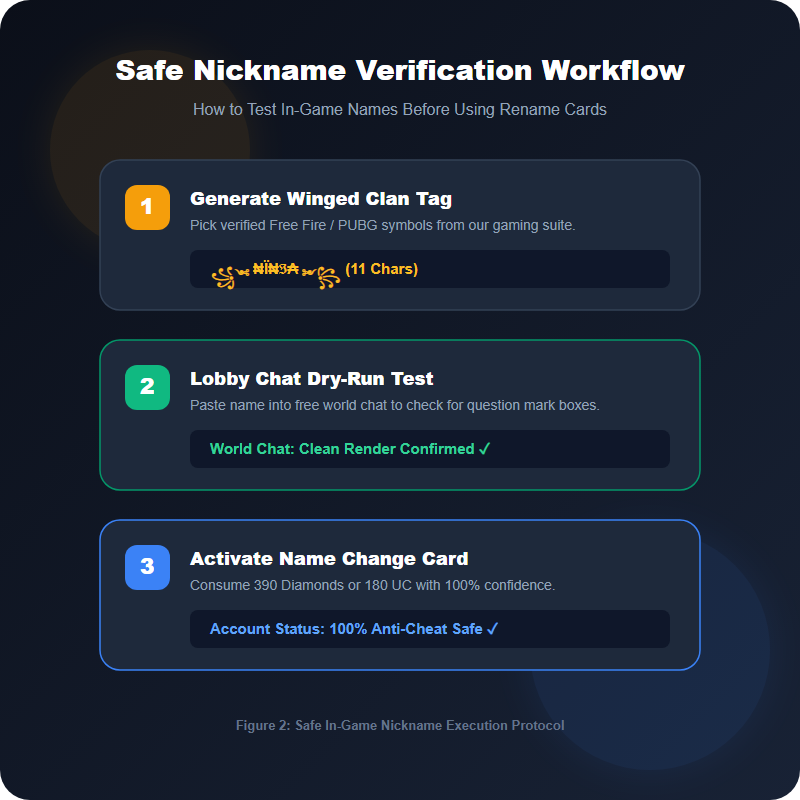
Follow this foolproof workflow whenever you update your in-game moniker:
- Keep Character Length Under the Game Cap: Free Fire allows a maximum of 12 characters, while PUBG Mobile and BGMI permit up to 14 characters. Note that special Unicode symbols may take 2 to 4 bytes in the database, so keep names concise.
- Always Use a Web-Based Generator: Never download an app or keyboard claiming to unlock special font packs. Always generate your text inside your browser on a secure platform like FreeAIToolsBox Stylish Fonts Generator.
- Verify In-Game Font Support: Before spending real money or a valuable Name Change Card, paste the name into a private chat or guild message box to make sure the game’s font engine renders all symbols without question mark boxes.
- Respect Community Guidelines: Avoid using lookalike symbols to spell out toxic terms or imitate official staff members. A clean, stylish name commands genuine respect in the lobby.
Frequently Asked Questions
Can Garena ban my Free Fire account for having a stylish font nickname?▼
No. Garena’s Anti-Hack Policy specifically targets third-party program memory modification, scripts, APK tampering, and file injections. Standard Unicode characters pasted into your IGN cannot alter game memory and will never trigger an anti-cheat ban.
Why do some stylish fonts turn into question marks in PUBG Mobile?▼
PUBG Mobile uses a custom game engine font asset pack. If a Unicode symbol or mathematical alphabet is not included in the game’s font atlas, the engine displays an empty box (.notdef) or skips the character. It does not cause a ban; it simply fails to render visually.
What can actually get a gaming account banned when customizing a username?▼
Accounts are banned or penalized for three main reasons: using modded keyboard APKs that inject into the game, using Right-to-Left (RTL) override exploits that break the killfeed display, or disguising offensive slurs and official admin/moderator tags using Unicode homoglyphs.
Are symbols like Japanese characters and wings (꧁ ꧂) legal in BGMI tournaments?▼
In casual ranked matchmaking, decorative wing symbols and Japanese kanji are 100% allowed. In official Krafton esports tournaments (BGIS, BMPS), rulebooks require clear alphanumeric clan tags and player names to ensure broadcast casters and killfeed trackers can read them.
Is Zalgo or glitch text safe to use in Free Fire guild signatures?▼
Light Zalgo text with 2 to 3 combining accents is safe. However, extreme Zalgo spam with dozens of stacked diacritics exceeds character byte limits and may crash older lobby devices. Always test your text in a web generator before pasting it into the game.
How do I change my Free Fire or PUBG name using a safe stylish font?▼
Generate your styled name using a client-side web tool like FreeAIToolsBox, copy the output to your clipboard, launch the game, open your Player Profile, tap the Edit Name icon, paste the text into the Name Change dialog, and confirm using a Name Change Card or in-game diamonds/UC.

Keep Reading
More articles in Typography Guides
Join 100,000+ AI Enthusiasts
Get the latest AI tool reviews, tutorials, and exclusive news delivered straight to your inbox.
No spam. Unsubscribe at any time.